3-way match queue
Bills awaiting PO+GRN reconciliation. Auto-matches paid; variances surfaced for resolution.

3-way matching at 97% auto-rate. Tax treatment resolved at the line, W-9 status checked before payment, discounts caught before they lapse. The AP queue runs itself.
The AP Manager dashboard prioritises action. Approve, match, schedule, escalate.
Bills awaiting PO+GRN reconciliation. Auto-matches paid; variances surfaced for resolution.
Bills awaiting approval, prioritised by due date, vendor and amount. Single-tap from Slack.
Risk score per vendor: W-9 on file, taxpayer number matched, past disputes, payment performance.
Cash needed this week, next week, next month. Discount opportunities and tight cash flagged.
Blocked claims and receipts that were never tax invoices, before the return.
Early-pay discounts about to lapse, ranked by the return on taking them.
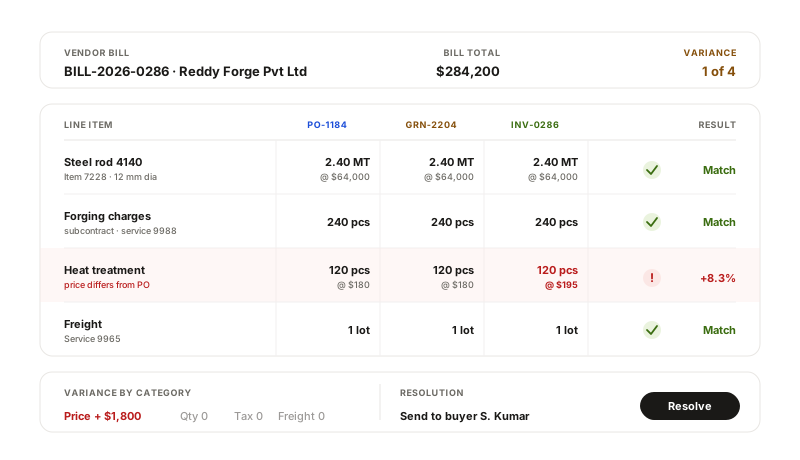
When a vendor invoice arrives, the platform pulls the PO and the goods receipt note. Each line is matched on quantity and price with tolerances you set. Exact matches queue for payment; variances surface with the source records open for resolution.
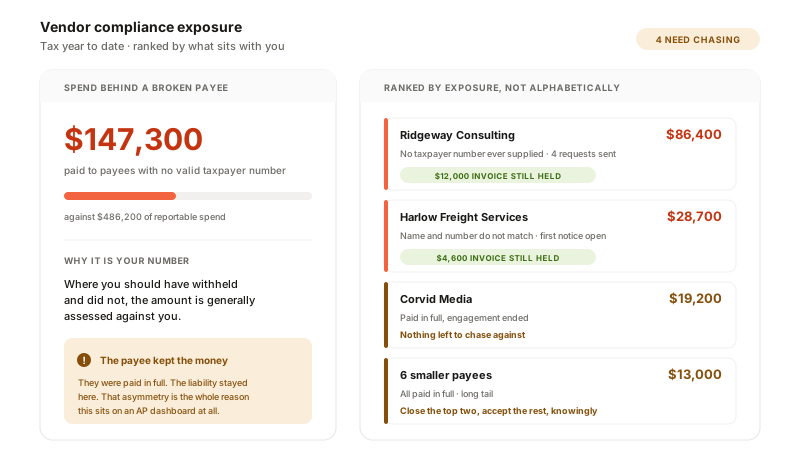
Nothing here depends on what your vendor files, which leaves the exposure that is genuinely yours: a payee with no W-9 whose withholding becomes your liability, a taxpayer number that does not match IRS records, and a taxable purchase nobody charged tax on that you now owe as use tax. All three surface at the bill rather than at year end, which is the difference between a correction and an assessment.
BILL, Tipalti and Stampli execute payments and we do not, so if paying from inside the tool is the requirement, look at them. What none of them holds is the vendor record itself: onboarding, documents and their expiry, contract renewals, performance and concentration, against the same object the invoice runs on. Approvers are also not priced per seat here, which matters once you stop rationing them. Ask us for a side-by-side on your own bill volume rather than taking that on trust.
96 to 98% first-pass accuracy on header fields for a clean document, lower on a photographed one, with confidence shown per field so your team reviews what is uncertain rather than everything. Vendor-specific templates are learned after a few samples. There is no e-invoicing network to fall back on in the US, so extraction quality on unstructured documents carries more weight here than it does elsewhere.
Configurable rules: by amount, vendor, GL category, cost centre, location. Multi-step parallel and sequential chains. Slack/email/in-app notifications. Auto-escalation when an approver is OOO. Audit log of every approval, override and rejection.
Duplicate detection at ingest: same vendor + same amount + same date in 30 days flags as potential. Same PO + same GRN flags strongly. Override allowed with comment that lands in the audit log.
Early-payment discounts surfaced per bill at ingest. The cash forecast lets you see which discounts are economical to take and which to skip. Auto-take discounts above a threshold can be configured.
We do not move money in the US. The approved run exports as a NACHA ACH file for your bank, or the approved bills push to your ERP and pay from there, and the bank feed closes them out as paid. We take no cut and hold no float, so you keep whatever rate your bank already gives you rather than paying a platform per transaction.
A 30-minute walkthrough of the AP workflow on your bill volume, your vendors and your approval chain.