
Skip to content

Receivables

Accounts receivable software, from quote to cash on one record.

Quotes, sales orders, invoices, receipts and credit notes on one customer record. Aging stays live, and every receipt ties back to the invoice it settles.

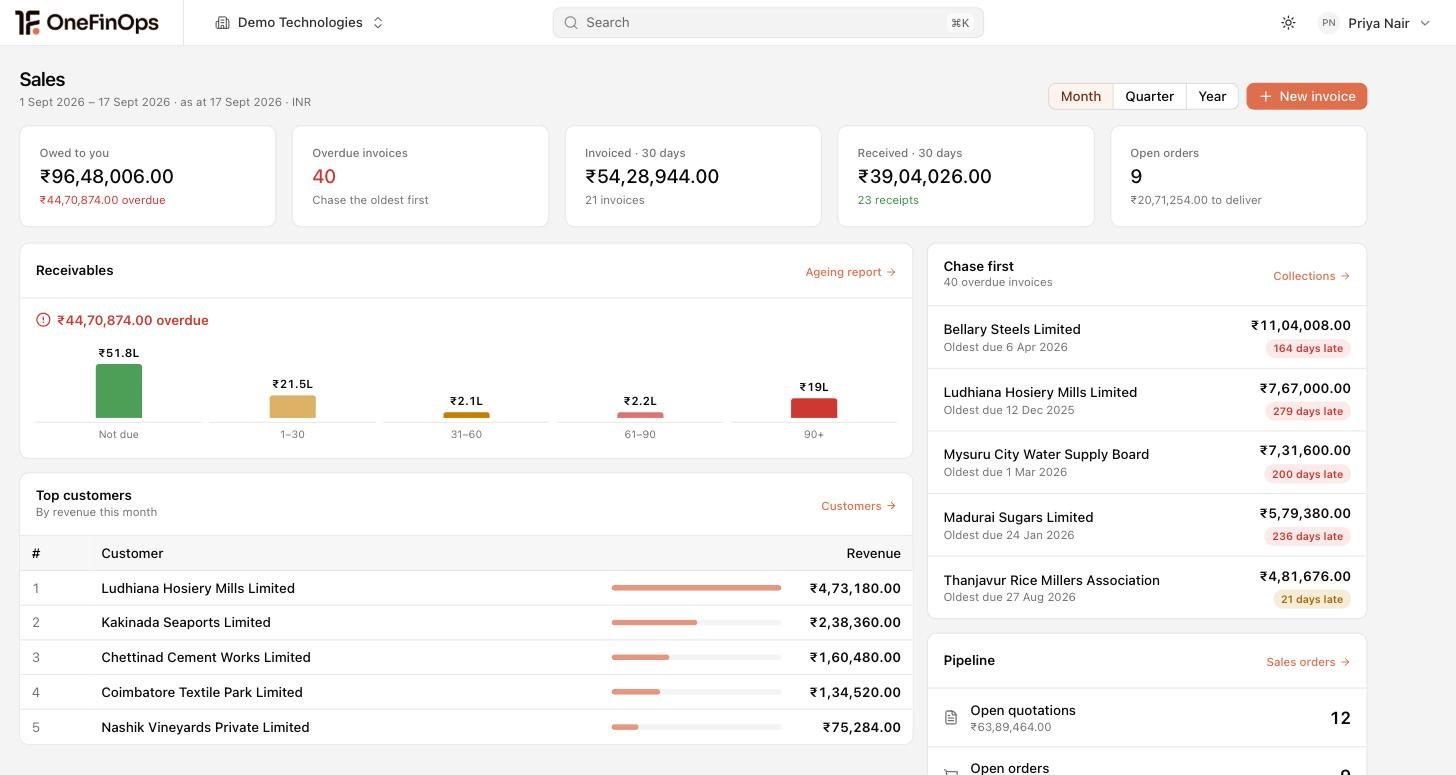
Accounts Receivable dashboard with total receivables, overdue, DSO, collection efficiency, aging summary and quote-to-cash pipeline.

Trusted by finance teams

  • PathoGenie
  • Sharada Agro Industries
  • SRF Capital
  • Absolute Labs
  • CultSet
  • Lead with Tribe
  • GehnaERP
  • Beacon
  • Praval
  • EverUptime

Customer 360

One customer record. Every transaction in view.

Quotes, sales orders, invoices, receipts, credit notes, payment history, credit limit, contacts and documents on the same customer record. The same record sales, AR and the CFO post against. No second master to reconcile.

Customer 360 screenshot

Quotes & Sales Orders

From quote to sales order, with the trail intact.

Line-level discounts and tax on every quote. Approvals enforce by amount and discount percentage. Version history per quote, one-click conversion to a sales order, and the credit limit checked at the order rather than at the invoice.

Quotes & Sales Orders screenshot

Recurring Invoices

Recurring invoices, every cycle, without the diary.

Schedule monthly, quarterly or annual cycles. Each cycle raises a fresh invoice with the right tax treatment and delivers it by email. Follow-ups fire automatically when an invoice stays open past due.

Recurring Invoices screenshot

Payment Follow-ups

Reminders that run themselves.

Templated reminders fire on aging-bucket transitions (0-30, 30-60, 60-90, 90+). Tone adjusts to the customer relationship and history. Email and call queues are integrated, and replies route into the AR inbox rather than someone’s personal mail.

Payment Follow-ups screenshot

Credit Management

Credit limit at the order. Not at year-end review.

Per-customer credit limits on the customer record, with live utilisation across open orders, invoices and receipts. A breach blocks the next sales order with an override path. The trigger fires before despatch, not after the payment fails.

Credit Management screenshot

Receipt Allocation

Bank receipts allocated by morning.

Receipts pull from connected banking daily and auto-match on amount, reference and customer. Advances and partial payments are handled. FX gain or loss posts on foreign-currency collections at the rate on the day.

Receipt Allocation screenshot

Credit Note Management

Credit notes that keep the tax trail straight.

Sales returns, post-supply discounts and rate revisions handled as credit notes against the original invoice. The tax adjustment follows the credit note, so your return and your customer’s claim stay aligned.

Credit Note Management screenshot

Customer Statement of Account

Statements that send themselves.

Per-customer statement of account with open invoices, receipts, credit notes and a running balance. Bulk send by email on a schedule. Year-end balance confirmations export hash-verified for the auditor.

Customer Statement of Account screenshot

Export Invoicing

Cross-border invoicing without the scramble.

Invoices raised in the customer’s currency with your reporting currency alongside. Zero-rating decided at invoice creation with the supporting evidence attached, rather than argued about during a review.

Export Invoicing screenshot

Buyer FAQ

What teams ask before they switch.

Will payment reminders sound robotic to a long-standing customer?

No. Reminder templates are tone-aware. The cadence and language for a 12-year customer with one late invoice is different from a new customer with three. Templates pull customer-specific context (their PO number, their last payment date, their typical cycle) so the reminder reads like a personal note. Approve before send, or auto-send for approved templates.

How are partial payments and advances handled?

Partial payments allocate to the oldest open invoice by default; the AR team can override at the receipt screen. Advances sit on the customer record and auto-allocate when matching invoices are raised. The customer ledger always reflects the net position.

What about FX gain or loss on foreign-currency invoices?

The gain or loss is computed at receipt against the invoice rate and posted to the configured GL inline. The rate on the day is used by default, and a specific rate can be pinned per receipt where your treasury policy requires it.

We run several entities. Does AR roll up?

Yes. Each entity invoices in its own currency under its own tax rules, and the group receivables position rolls up on the same record. A customer buying from two entities is one customer record, not two.

Can our auditor see customer-wise outstanding for year-end confirmation?

Yes. Reviewer access provides read-only customer ledgers, ageing buckets and statement of account exports. Year-end balance confirmation packages export per customer or in bulk, hash-verified.

How is tax applied on the invoice?

The treatment is decided when the invoice is raised, not reconstructed at quarter end. Whether a supply is standard-rated, zero-rated or exempt turns on the customer and the supply, and that decision carries its evidence into the return.

See the cycle on your last quarter of invoices.

Connect one entity, free. Upload last quarter's invoices and receipts. The auto-allocation, the follow-up cadence and the aging all run on your real customers. Not a sandbox.