


Information Reporting | Payee Tracking
The totals build all year. Not in January.
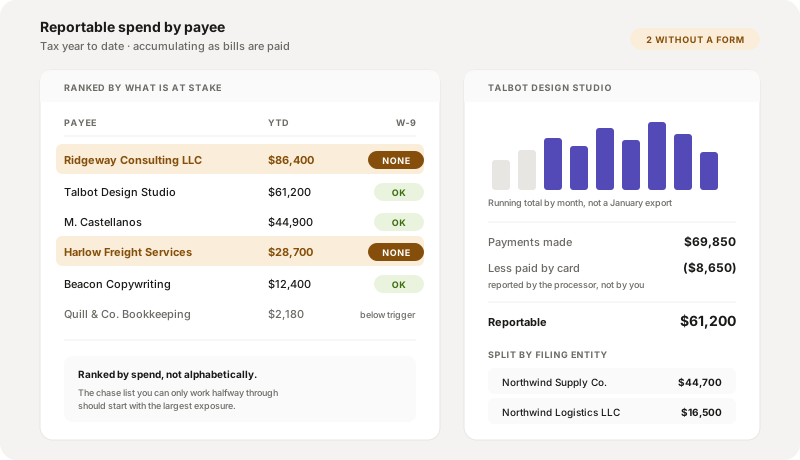
Reportable spend accumulates per payee as bills are paid, tied to the taxpayer name and number collected before the first payment went out. When the filing window opens you are checking a figure that has been correct all along, rather than assembling one from twelve months of payment history and hoping the coding was consistent.
What the system does
Capability, input, output.
| Capability | Input | Output |
|---|---|---|
| Running totals | Payments as they are made | Reportable spend per payee, per box, per year, updated continuously |
| Threshold view | Totals against your configured trigger | Payees over, payees approaching, and payees clearly out of scope |
| Identity binding | The W-9 collected at onboarding | Totals held against a taxpayer name and number, not a display name |
| Missing-form exposure | Payees with reportable spend and no W-9 | A chase list, ranked by spend, while the payee still wants paying |
| Payment-method split | Payments made by card | Separated, since card payments are generally reported by the processor instead |
| Entity roll-up | One payee paid by several of your entities | Totals per filing entity, because each files its own returns |
| Year close | The year ending | The population frozen for review, with later corrections tracked as corrections |
-
Running totals
- Input
- Payments as they are made
- Output
- Reportable spend per payee, per box, per year, updated continuously
-
Threshold view
- Input
- Totals against your configured trigger
- Output
- Payees over, payees approaching, and payees clearly out of scope
-
Identity binding
- Input
- The W-9 collected at onboarding
- Output
- Totals held against a taxpayer name and number, not a display name
-
Missing-form exposure
- Input
- Payees with reportable spend and no W-9
- Output
- A chase list, ranked by spend, while the payee still wants paying
-
Payment-method split
- Input
- Payments made by card
- Output
- Separated, since card payments are generally reported by the processor instead
-
Entity roll-up
- Input
- One payee paid by several of your entities
- Output
- Totals per filing entity, because each files its own returns
-
Year close
- Input
- The year ending
- Output
- The population frozen for review, with later corrections tracked as corrections
Payee Tracking FAQ
What buyers ask.
Why not just run a report in January?
Because a January report tells you about a problem you can no longer fix cheaply. A vendor with no W-9 who was paid in full in March has no reason to send you one now. The same list in March is a chase against an unpaid invoice, which is a conversation that works.
Why are card payments separated out?
Because payments made by card or through certain third-party networks are generally reported by the processor rather than by you, and including them in your own totals overstates the population. Teams that pay a contractor partly by check and partly by card are the ones this catches.
Do you tell us the reporting threshold?
The trigger is configured and is yours or your advisor's to keep current. We do not print a threshold figure in our copy, because these have moved more than once in recent years and a stale number is the kind of detail a buyer checks in a single search. What the system does is measure against whatever you set and show you who is near it.
One vendor is paid by three of our entities. How does that total?
Per filing entity, because each entity files its own returns under its own employer identification number. A group total is available for a payee view, but it is not what gets filed, and merging them is a mistake that only shows up when the payee queries a form.
What happens if we find an error after filing?
It is tracked as a correction against the original rather than by editing the original quietly. The distinction matters because a corrected return is a specific thing with its own handling, and a system that just overwrites leaves you unable to show what was filed the first time.
See your reportable spend by payee, today.
Connect your books, free. Totals build from the payments you have already made, with the missing forms ranked by what is at stake.