



Step 01
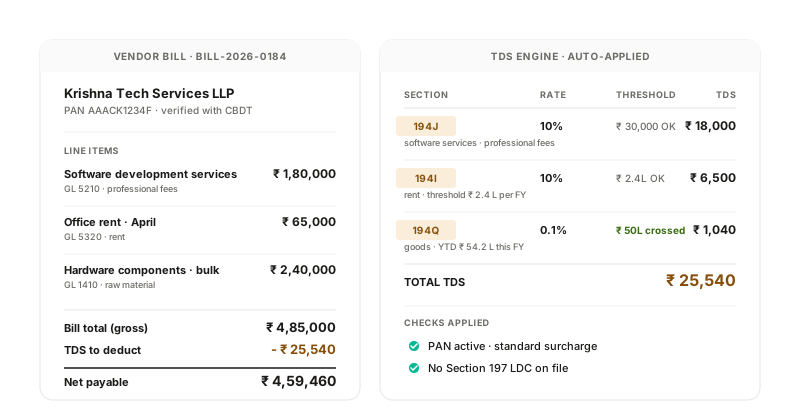
Section + rate per line
Line description, GL and vendor type drive the section. 194C contractor, 194J professional, 194I rent, 194Q goods, 194O e-commerce all resolved at the line.

Financial Operations
Tax, E-Invoicing & Compliance
By Role
By Industry
Resources
TDS Software | TDS Auto-Deduction
Each bill line is assigned a TDS section (194C, 194J, 194I, 194Q, 194O), a rate and an applicable threshold based on its description, GL coding and vendor type. Vendor PAN verified live with CBDT. Section 197 LDC honoured at the line.
How it works
Line description, GL and vendor type drive the section. 194C contractor, 194J professional, 194I rent, 194Q goods, 194O e-commerce all resolved at the line.
Vendor PAN checked against CBDT's PAN status API at capture. Active or inoperative drives the surcharge bucket and Section 206AA/AB rate.
Section 197 lower-deduction certificate (section, rate, validity) loaded per vendor. Lower rate applied to bills posted within the certificate window.
Section thresholds (₹30K for 194J, ₹1L for 194C, ₹50L for 194Q) tracked per vendor + section across the FY. The line where the threshold breaches is the line where deduction starts.
What the system does
| Capability | Input | Output |
|---|---|---|
| Section + rate engine | Line description + GL + vendor type | Section, rate and threshold per line |
| Live PAN check | Vendor PAN | Active / inoperative + surcharge bucket |
| LDC handling | Cert section + rate + validity | Override at line per cert window |
| FY threshold tracker | Per-vendor, per-section YTD totals | Threshold-breach flag at the line |
| Mixed-section bill | Multi-line invoice with different GLs | Multi-section TDS computed per line |
| Section 206AA / 206AB | Inoperative PAN + non-filer status | Higher-rate deduction applied |
Section + rate engine
Live PAN check
LDC handling
FY threshold tracker
Mixed-section bill
Section 206AA / 206AB
Compliance + integrations
Sections 194C, 194J, 194I, 194Q, 194O, 195, 197, 206AA and 206AB all applied per the law. Section 206AA + 206AB combined for inoperative-PAN / non-filer rates.
Regulations we work within
Sections 194C / 194J / 194I
Section assigned per line with the right rate and threshold.
Section 194Q + 206C(1H)
Buyer/seller turnover cross-checked to resolve which side deducts vs collects.
Section 197 LDC
Lower-deduction certificate applied per vendor and validity window.
Section 206AA + 206AB
Higher-rate deduction for inoperative PAN or non-filer vendors.
Connects to
TDS Auto-Deduction FAQ
Line description, GL coding and vendor primary service category drive the default. Rules configurable per organisation; AP team can override at the line with reason captured in the audit trail.
Section 206AA + 206AB combined: an inoperative PAN attracts the higher of (a) 20% or (b) double the normal rate. The system applies it automatically when the live CBDT check returns inoperative status.
Yes. Surcharge brackets (10%, 15%, 25%, 37%) and cess (4%) applied based on vendor type (individual, firm, company), residency status and PAN status. Auto-applied at the line.
More in TDS Software
Live PAN status check with CBDT. Active / inactive / not registered. Section 206AA on invalid PAN.
See PAN VerificationUpload, validity window, rate override, auto-expiry. Section 197 lower-deduction certificates honoured.
See Section 197 LDCBuyer/seller turnover thresholds tracked per relationship. Right side computed at posting.
See 194Q vs 206C(1H) DecisioningConnect one entity, free. Post a bill with a 194C line and a 194J line. Watch the deduction resolve at each line, with PAN status checked live.