



Step 01
TRACES extracts pulled
Challan-status, deductee-defaults, conso-files and 26AS pulled from TRACES on a schedule.

Financial Operations
Tax, E-Invoicing & Compliance
By Role
By Industry
Resources
TDS Software | TRACES Reconciliation
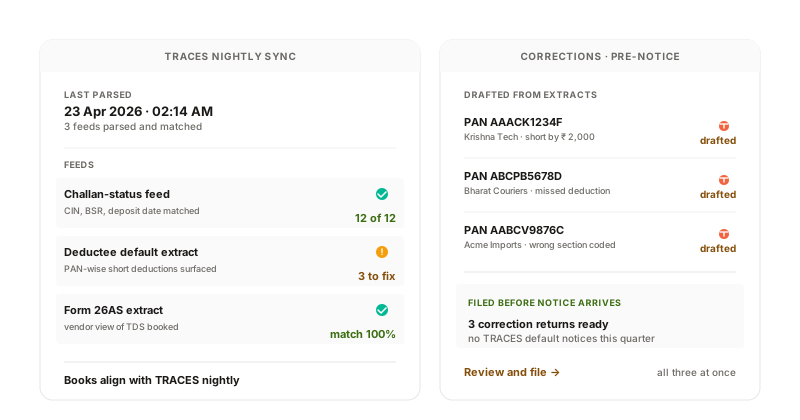
TRACES challan-status, deductee-default and 26AS extracts parsed automatically. Matched against your deduction register. Variances surface for action. Correction returns drafted before TRACES issues a default notice.
How it works
Challan-status, deductee-defaults, conso-files and 26AS pulled from TRACES on a schedule.
Each TRACES record matched against the deduction register on PAN, section, amount and challan reference.
PAN errors, amount mismatches, missing challan references, deductee-default flags surface on a dashboard.
Where corrections are needed, the system drafts a correction return (C1/C2/C3/C4 type) with the right correction file structure.
What the system does
| Capability | Input | Output |
|---|---|---|
| TRACES extracts | Scheduled pull per TAN | Latest challan + deductee + 26AS |
| Match engine | TRACES record + deduction register | Match status per record |
| Default surfacing | TRACES default notice | Defaults dashboard with drill-down |
| Correction draft | Variance + correction type | C1/C2/C3/C4 file ready for upload |
TRACES extracts
Match engine
Default surfacing
Correction draft
Compliance + integrations
TRACES reconciliation handles the back-end of the TDS lifecycle. Defaults caught before the notice arrives; corrections drafted ready for filing.
Regulations we work within
Section 200A
Intimation under 200A traceable to its source variance.
Section 154
Rectification of mistake apparent on record handled via correction return.
Connects to
TRACES Reconciliation FAQ
Default notices (short-deduction, late-payment, late-filing) are pulled into the dashboard with the underlying variance. The CFO and CA review; correction return is drafted automatically where applicable. Manual response is supported where the variance is disputed.
Challan status updates after the bank challan is paid (typically within 24-48 hours). Deductee defaults appear after the quarterly return processing (1-2 weeks). The system pulls daily and notifies on new defaults.
The conso-file is the consolidated TDS file maintained by TRACES per TAN per FY. It is required for filing correction returns. The system downloads and parses the conso-file automatically when a correction is needed.
More in TDS Software
Connect one TAN, free. The system pulls the latest TRACES extracts and reconciles against your books. Variances, defaults and pending corrections surface by morning.