



Step 01
Part A from TRACES
Part A (deducted-and-deposited summary) downloaded from TRACES per employee per FY. Quarter-wise breakdown auto-populated.

Financial Operations
Tax, E-Invoicing & Compliance
By Role
By Industry
Resources
TDS Software | Form 16 Generation
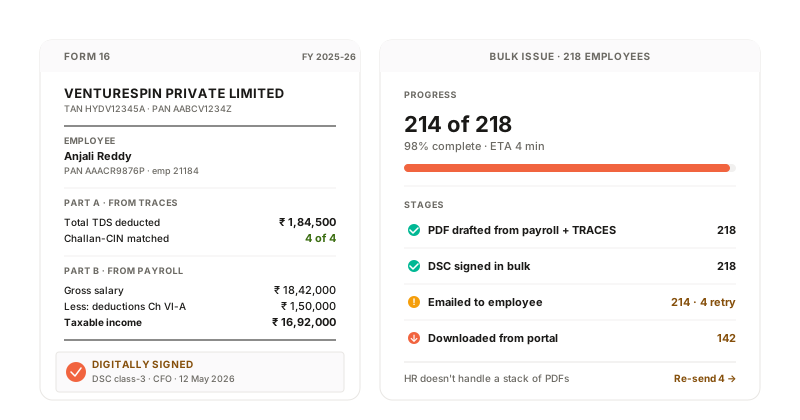
Annual Form 16 (Part A from TRACES + Part B from payroll) drafted automatically per employee. DSC sign-off captured. Emailed in bulk at FY-end. Employees self-serve from the portal; HR doesn't handle a stack of PDFs.
How it works
Part A (deducted-and-deposited summary) downloaded from TRACES per employee per FY. Quarter-wise breakdown auto-populated.
Part B (salary breakdown, exemptions under Section 10, deductions under Chapter VI-A, taxable income) drafted from your payroll system.
Both parts merged per employee. DSC sign-off captured in bulk by the authorised signatory.
Signed Form 16 emailed to each employee. Self-service download from the employee portal also available with audit trail.
What the system does
| Capability | Input | Output |
|---|---|---|
| Part A drafting | TRACES download per employee | Quarter-wise deducted-and-deposited summary |
| Part B drafting | Payroll TDS register + exemptions + Chapter VI-A | Salary breakdown + taxable income |
| DSC bulk-signing | Drafted Form 16 set + signatory DSC | Signed Form 16 per employee |
| Bulk email | Employee email master | Signed Form 16 delivered with read-receipt |
| Employee portal | Employee login | Self-service Form 16 download |
Part A drafting
Part B drafting
DSC bulk-signing
Bulk email
Employee portal
Compliance + integrations
Form 16 issued by the 15th of June for the preceding FY per Rule 31. DSC signing per Rule 31(3A). Emailed and portal-accessible per evolving practice.
Regulations we work within
Section 203, Income Tax Act
Certificate of TDS issued to the deductee.
Rule 31
Form 16 in TRACES-prescribed format, by the prescribed due date.
Connects to
Form 16 Generation FAQ
Each deductor (employer) issues its own Form 16 for the period of employment. The employee can claim aggregate TDS in their personal IT return; the system supports issuing Form 16 for partial-year employees correctly.
Yes. Form 16 is issued for the period of employment with that deductor. The system handles partial-year Form 16 with the right Part B salary breakdown.
Yes. Employee's declared regime (old or new) is captured at the start of the FY. Form 16 Part B reflects the chosen regime's exemptions and deductions.
Connect your payroll system, free. The next FY-end, Form 16 drafts for every employee with TRACES Part A merged in. DSC sign-off and bulk email are one click.