



Step 01
Per-vendor, per-section YTD
Every deduction posted updates the per-vendor, per-section YTD total. The threshold counter is visible at every bill.

Financial Operations
Tax, E-Invoicing & Compliance
By Role
By Industry
Resources
TDS Software | Vendor TDS Tracking
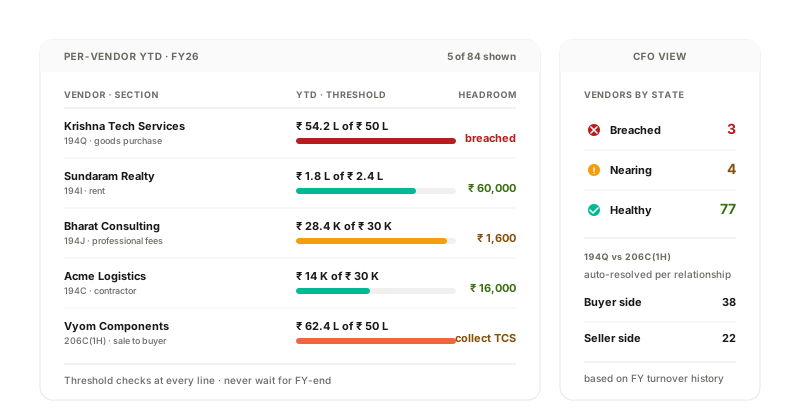
Per-vendor, per-section YTD totals tracked across the FY. Threshold breaches flag at the line where they happen. 194Q vs 206C(1H) auto-resolved per relationship based on turnover history. The CFO sees vendor-wise TDS exposure on one dashboard.
How it works
Every deduction posted updates the per-vendor, per-section YTD total. The threshold counter is visible at every bill.
When a vendor crosses ₹30K (194J), ₹1L (194C) or ₹50L (194Q), the line where the threshold breaches is the line where deduction starts.
Buyer + seller turnover histories cross-checked. Whichever side is liable under the law deducts/collects; the other suppresses.
Vendor-wise TDS exposure (deducted YTD, threshold position, LDC status, foreign vendor flag) on one dashboard.
What the system does
| Capability | Input | Output |
|---|---|---|
| YTD tracker | Bill posting + section | Per-vendor, per-section YTD total |
| Threshold flag | YTD vs section threshold | Breach flag at the line |
| 194Q vs 206C(1H) | Buyer + seller turnover | Auto-resolve which side acts |
| Vendor TDS dashboard | All-vendor, all-section state | CFO view of TDS exposure |
YTD tracker
Threshold flag
194Q vs 206C(1H)
Vendor TDS dashboard
Compliance + integrations
Threshold tracking under Section 194-series; 194Q vs 206C(1H) resolution under Section 194Q + 206C(1H); LDC handling under Section 197.
Regulations we work within
Section 194-series
Per-section thresholds tracked per vendor across the FY.
Section 194Q + 206C(1H)
Auto-resolved per relationship.
Section 197
LDC honoured at the line within the validity window.
Connects to
Vendor TDS Tracking FAQ
Yes. Threshold under Section 194-series is per-PAN, not per-GSTIN. The system tracks per PAN regardless of how many GSTINs the vendor operates under.
Yes. Section change at the vendor level applies prospectively from the change date. Bills posted before the change retain their original section; bills after the change use the new section. Both are captured in the audit trail.
Yes. The threshold is tracked per (vendor, section) pair. A vendor receiving both 194C and 194J payments has separate thresholds for each.
More in TDS Software
Section, rate, threshold and PAN-based logic applied at the line item. Vendor PAN verified live.
See TDS Auto-DeductionBuyer/seller turnover thresholds tracked per relationship. Right side computed at posting.
See 194Q vs 206C(1H) DecisioningUpload, validity window, rate override, auto-expiry. Section 197 lower-deduction certificates honoured.
See Section 197 LDCConnect one entity, free. The vendor TDS dashboard rolls up YTD deductions, threshold positions and LDC status for every vendor. The CFO sees exposure at a glance.